 In an efford to simplify my online dwellings, I’ve decided to finally use an external service to host my homepage. Since I am generating a static webpage using Hugo, and all its content is public anyway, hosting it on GitHub was the way to go.
Go MySQL driver working with new default authentication
 After the official release of MySQL 8.0, a few were complaining that the Go driver for MySQL did not have support for new default authentication method. It did indeed miss support, but this was already noticed and bug reported when moving to MySQL 8.0.4-rc. But, there was a valid workaround: you could (re-)create the users with a different authentication plugin, or set it globally in the configuration file using
 default_authenication_plugin.
A few days a ago, 1 June 2018, the good folks working on Go MySQL driver pushed a new feature to support the caching_sha2_password plugin (1 June 2018), pushed to master (so not yet released). Result: users with native passwords can login, as well as users using the new default. Nice work!
Unattended Install of MySQL 8.0 on Debian
 At work we are doing quite a bit with Debian. To make things easier and automated, we can use the non-interactive feature of the Debian packaging system to deploy services. One of the stacks we are enrolling is MySQL Group Replication, which requires at least 3 servers.
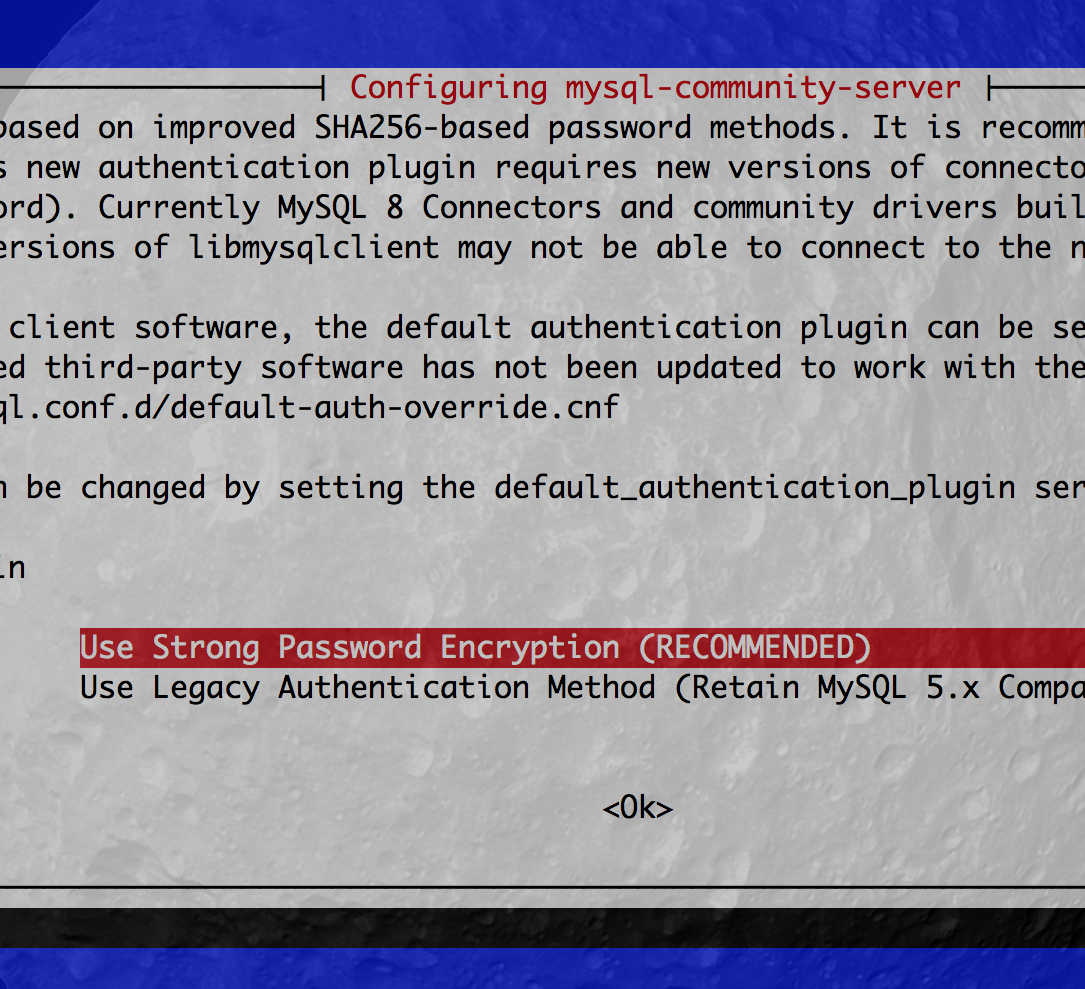
Although the MySQL Documentation show how to install MySQL non-interactively, it is not entirely complete. The missing part is the extra question during the installation of the server whether you want to keep using the new default authentention method, or use the (now) legacy native method.
If you are using a MySQL driver which has no support yet for strong password encryption (for example the go-sql-driver/mysql package driver), or you “need” to switch to MySQL 8.0 and keep previous user accounts intact, you will want to set the default back to the mysql_native_plugin for authentication. If you start new, and you can, stick to the new method.
This post will show how to install MySQL 8.0 on a Debian 9 using the official MSQL APT repositories. It also shows the extra step to keep using the legacy MySQL authentencation method.
Bonus: Ansible playbook included!
Joining tables with JSON docs using MySQL 8.0
 MySQL 8.0 got GA last month (April 2018) and that means it is time to get serious about getting back the relational in schema-less storage using the JSON datatype and JSON functions.
I have been very sceptic about JSON support in a RDBMS. The way XML was used in the past to store information, using functions to ‘query’ unindexable data.. a bit messy. This same mess exists with JSON, but it’s much easier to parse (=faster), easier to read, and still easy to mess it up (for nostalgics).
This post is about getting back relational with JSON document storage, joining tables using schema-less stuff. Yes, I used a buzz word!
The Go Year
 Leaving the MySQL Team mid 2016 was personally quite something. I needed a change, but I didn’t realise it would change that much.
I started my new job at DCSO working on project written in Python. With my experience creating MySQL Connector/Python I felt right where I should be. Good colleague, nice office, no more alone at home.. Soon, however, my scepticism of Go, the other programming language used at work, moved to acceptance. And here I am, more than a year later, writing pretty much everything using in Go.
GraphQL servers and clients, single-binary web server applications, new ways using MySQL, .. those are a few things I’ve been doing. I am still discovering the possibilities, and also the pains. Yes, there are things that annoy me, but I consider that more a good thing; nothing is perfect.